Your proper running journey starts now

Your whole running life, on your Mac.

Every run your Apple Watch has recorded, with splits, heart rate and route, next to the recovery numbers that tell you what tomorrow should be. Private, on your Mac.

One email on launch day. No newsletter.

The heatmap: years of runs and walks drawn over the map of Prague, brightest where routes repeat.
Your runs and walks on one map, for a month, a year or all of them, with the stretches you repeat most.
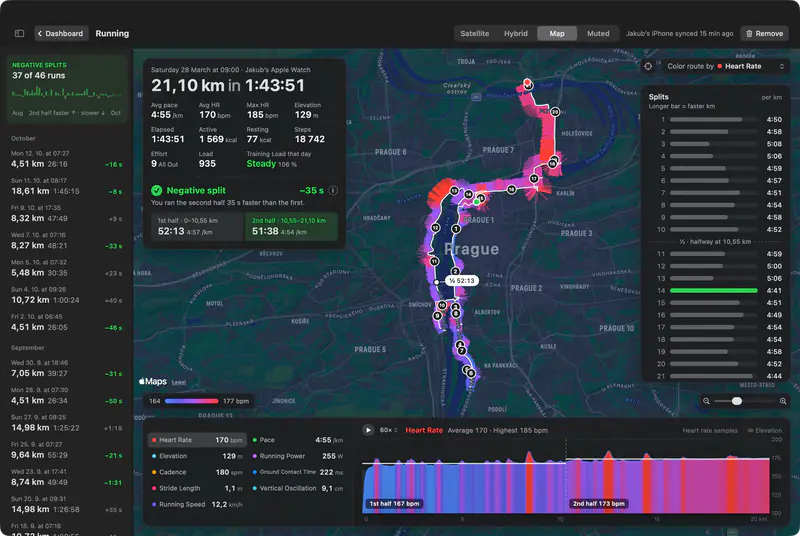
A run's page: a half marathon on the map with its pace and heart rate, the kilometre splits and the heart rate zones.

Runs

Learn something from every run.

Open any run to see where the pace slipped, where your heart rate climbed and which hill did it, drawn on the route you ran. Next time, you know where to hold back.
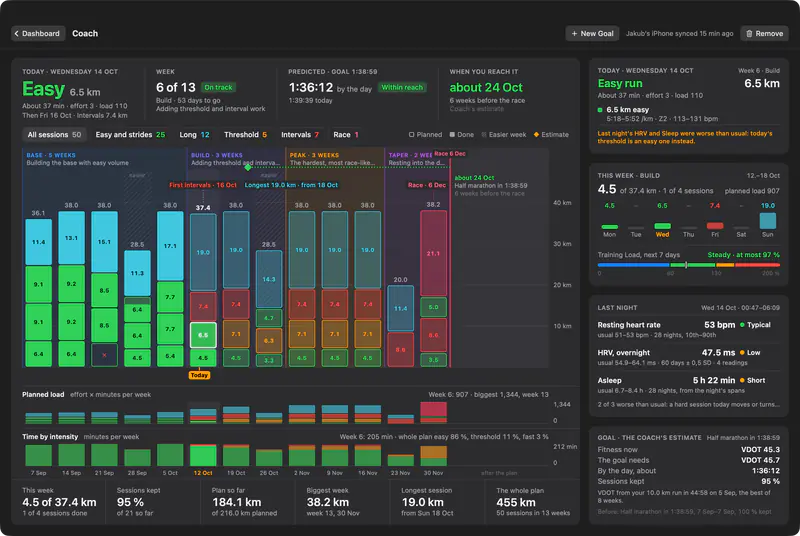
The Coach page: a half marathon plan in phases, this week's sessions, and today's threshold run turned easy after a poor night.

Coach

Train hard only on the days you can take it.

Coach builds every week up to race day from paces you have actually run. After a short night or a low HRV it swaps today's hard session for an easy one, so you reach the start line fit, not hurt.
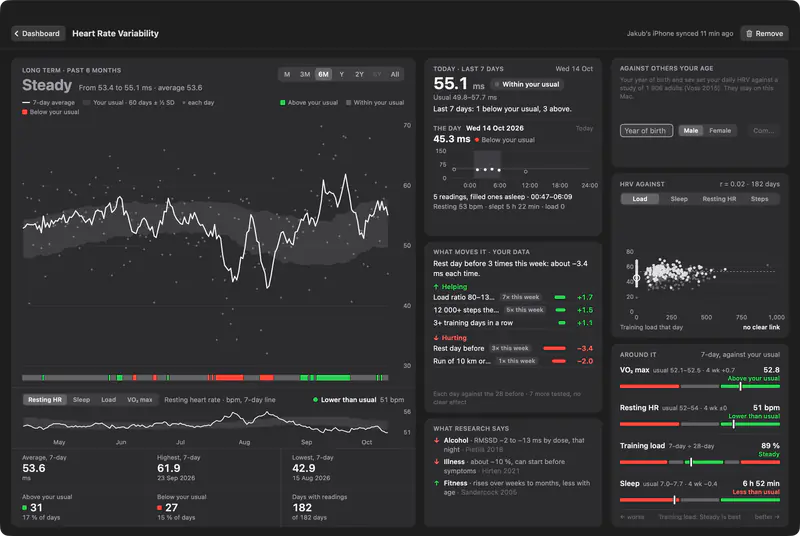
The HRV page: nightly heart rate variability against a shaded band built from your own previous 60 days, and today's reading inside it.

Recovery

Know when to push and when to rest.

HRV, resting heart rate and cardio recovery are checked against your own last weeks, not against someone else's average. Green, go. Red, keep tomorrow easy.

See how your body handles the training.

A run's splits panel: every kilometre of a half marathon with its pace.

Line up today with last spring.

Every run keeps its splits, zones, cadence and elevation, so this morning's 10 km sits next to the one you ran a year ago.

Training load today: 89 percent, steady, with room for about 676 more today.

Add kilometres without getting hurt.

Your last week of effort against your last four. Stay in the steady band and the extra volume makes you fitter, not injured.

The VO2 max page: your estimates over time, drawn against your usual range.

See your fitness actually rise.

Every VO2 max estimate your watch has made, on one line across the years: proof the slow weeks paid off.

The resting heart rate page: six months of readings against your own band.

Catch a cold before it catches your run.

A resting heart rate a few beats above your normal is often the first sign of illness or a hard week. You see it in the morning, before you lace up.

The cardio recovery page: six months of how far heart rate falls in the minute after a run.

Watch your heart recover faster.

How far your heart rate falls in the minute after a run. As you get fitter it drops further, and you can see it happen.

The sleep page: a month of nights, with the daily average of 7 h 9 min.

Know why today's run felt heavy.

Deep, core and REM sleep against your usual nights. When a run feels flat, last night usually explains it.

Every number, and what it means for you.

Too much, or too little?Last 7 days against the last 28. 80 to 130% is safe.

The Training Load page: a seven day against twenty-eight day ratio with the steady band marked.

Swipe to see the whole screen

Your health data stays home.

The iPhone app reads Apple Health and sends it straight to your Mac over your own network. There is no server in between, no account to make and no iCloud sync. Turn the iPhone app off and nothing leaves the phone.

Set it up once, then just run.

  1. Install it on your Mac

    It lives in the menu bar. One click opens your dashboard.

  2. Open the free iPhone app

    Allow Apple Health and it finds your Mac on the same Wi-Fi.

  3. Pick what comes over

    Years of history arrive in the first sync, and new runs follow on their own.

Pricing

$2.50/mo

Billed yearly at $29.99

Start 7 days free

Wiser with every run.

Negative Splits launches on [LAUNCH DATE]. Leave your email and we write once, on the day.

One email on launch day. No newsletter.

Questions

What does it cost?

$2.50/mo, billed yearly at $29.99, after a 7-day free trial. One plan with everything in it. The iPhone connector app is free.

When does it launch?

[LAUNCH DATE]. Everyone on the list hears first.

What do I need?

A Mac with macOS 26 and an iPhone with Apple Health, on the same network. An Apple Watch is recommended: heart rate, HRV, sleep, VO2 max and run details come from it.

Does my health data go to a server?

No. It travels from your iPhone to your Mac over your local network and is stored only on your Mac. There is no account and no iCloud sync.

What can Coach plan for?

A race on a date, a faster time over a distance, a weekly volume or a fitness target such as VO2 max, for running, walking or cycling.

Does it bring in my old workouts?

Yes. Everything Apple Health holds comes over on the first sync, so your trends, run pages and heatmap start with years of history.

Is it only for running?

Running gets the most: splits, heart rate zones, the heatmap and Coach. Rides, walks, hikes and swims come over too, from all 81 workout types Apple Health knows, each with its own page.